













About FamiDash
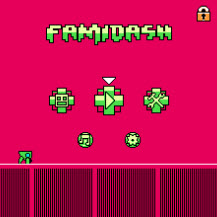
FamiDash is a fan-made NES demake of Geometry Dash, with movement forms such as cube, ship and UFO. Normal play asks for a complete run, while Practice supports checkpoints for learning a difficult section. The controls below use the RocketGames browser emulator layout.
How to Play FamiDash
Use Left/Right Arrow to navigate menus and X to select. X or Up Arrow performs the jump action, and Enter pauses or confirms a selection. Learn a short pattern in Practice before trying to repeat it in a full normal run. A form change is a reason to adjust the timing rather than keep repeating the input that worked in the previous segment.
Move from Practice to a Full Run
Use Practice to isolate a sequence that repeatedly ends an attempt. Begin far enough before the difficult obstacle to learn the approach as well as the input at the obstacle itself. When the sequence is repeatable, connect it to the part immediately before it.
Cube, ship and UFO sections require different timing. After a form transition, pay attention to the new route instead of carrying the previous input pattern forward unchanged. Normal play asks you to bring those sections together in one complete run.
Controls
| Input | Action |
|---|---|
| Left / Right Arrow | Navigate menus. |
| X | Select / jump. |
| Up Arrow | Jump. |
| Enter | Pause / select. |
| Z | Back / exit in menus. |
| Shift + Enter | Leave the level. |
Practical Tips
- Use Practice to isolate a troublesome transition.
- Return to normal play after the pattern is repeatable, rather than confusing a checkpoint-assisted attempt with a complete run.